# The Python Tutorial
This tutorial is designed for programmers that are new to the Python language, not beginners who are new to programming.
Python is an easy to learn, powerful programming language. It has efficient high-level data structures and a simple but effective approach to object-oriented programming. Python’s elegant syntax and dynamic typing, together with its interpreted nature, make it an ideal language for scripting and rapid application development in many areas on most platfor
The Python Tutorial
Tip
This tutorial is designed for programmers that are new to the Python language, not beginners who are new to programming.
Python is an easy to learn, powerful programming language. It has efficient high-level data structures and a simple but effective approach to object-oriented programming. Python’s elegant syntax and dynamic typing, together with its interpreted nature, make it an ideal language for scripting and rapid application development in many areas on most platf
The Python Tutorial
Tip
This tutorial is designed for programmers that are new to the Python language, not beginners who are new to programming.
Python is an easy to learn, powerful programming language. It has efficient high-level data structures and a simple but effective approach to object-oriented programming. Python’s elegant syntax and dynamic typing, together with its interpreted nature, make it an ideal language for scripting and rapid application development in many areas on most platforms.
The Python interpreter and the extensive standard library are freely available in source or binary form for all major platforms from the Python website, https://www.python.org/, and may be freely distributed. The same site also contains distributions of and pointers to many free third party Python modules, programs and tools, and additional documentation.
The Python interpreter is easily extended with new functions and data types implemented in C or C++ (or other languages callable from C). Python is also suitable as an extension language for customizable applications.
This tutorial introduces the reader informally to the basic concepts and features of the Python language and system. Be aware that it expects you to have a basic understanding of programming in general. It helps to have a Python interpreter handy for hands-on experience, but all examples are self-contained, so the tutorial can be read off-line as well.
For a description of standard objects and modules, see Python built-ins reference and The Python standard library. The Python Language Reference gives a more formal definition of the language. To write extensions in C or C++, read Extending and Embedding the Python Interpreter and Python/C API reference manual. There are also several books covering Python in depth.
This tutorial does not attempt to be comprehensive and cover every single feature, or even every commonly used feature. Instead, it introduces many of Python’s most noteworthy features, and will give you a good idea of the language’s flavor and style. After reading it, you will be able to read and write Python modules and programs, and you will be ready to learn more about the various Python library modules described in The Python standard library.
The Glossary is also worth going through.
- 1. Whetting Your Appetite
- 2. Using the Python Interpreter
- 3. An Informal Introduction to Python
- 4. More Control Flow Tools
- 4.1.
if
Statements - 4.2.
for
Statements - 4.3. The
range()
Function - 4.4.
break
andcontinue
Statements - 4.5.
else
Clauses on Loops - 4.6.
pass
Statements - 4.7.
match
Statements - 4.8. Defining Functions
- 4.9. More on Defining Functions
- 4.10. Intermezzo: Coding Style
- 4.1.
- 5. Data Structures
- 6. Modules
- 7. Input and output
- 8. Errors and Exceptions
- 9. Classes
- 10. Brief tour of the standard library
- 10.1. Operating system interface
- 10.2. File wildcards
- 10.3. Command-line arguments
- 10.4. Error output redirection and program termination
- 10.5. String pattern matching
- 10.6. Mathematics
- 10.7. Internet access
- 10.8. Dates and times
- 10.9. Data compression
- 10.10. Performance measurement
- 10.11. Quality control
- 10.12. Batteries included
- 11. Brief tour of the standard library — part II
- 12. Virtual Environments and Packages
- 13. What Now?
- 14. Interactive Input Editing and History Substitution
- 15. Floating-Point Arithmetic: Issues and Limitations
- 16. Appendix
# Understand the text-based programming language of Python
Python is a popular text-based programming language that can be used for a wide variety of applications. Students can transition more easily from block-based programming languages to Python rather than other text-based languages because:
- Python is considered concise and easy to read
- Python can be interpreted one line at a time, which makes it easy to find mistakes or errors
- Python is highly versatile and can be used for both small
Understand the text-based programming language of Python
Python is a popular text-based programming language that can be used for a wide variety of applications. Students can transition more easily from block-based programming languages to Python rather than other text-based languages because:
- Python is considered concise and easy to read
- Python can be interpreted one line at a time, which makes it easy to find mistakes or errors
- Python is highly versatile and can be used for both small an
Understand the text-based programming language of Python
Python is a popular text-based programming language that can be used for a wide variety of applications. Students can transition more easily from block-based programming languages to Python rather than other text-based languages because:
- Python is considered concise and easy to read
- Python can be interpreted one line at a time, which makes it easy to find mistakes or errors
- Python is highly versatile and can be used for both small and complex tasks
- Python is used across multiple industries such as data science, software engineering, app development, and machine learning
Why should I teach Python programming?
Our world is digitally connected. Every single day, the average individual utilizes technology. This technology is often built by coding in dozens of different ways. We have apps, software, social networks, and a million other creatively enabled pieces of code that shape our daily lives.
Learning to code teaches young people skills that stretch far beyond the computer. From problem solving, abstraction, and critical thinking, the benefits of learning to code are immense. Young people also can have fun, be creative, and build future ready skills to help them in their future careers and pathways.
How do I get started with Python programming in my classroom?
Minecraft Education offers a full computer science progression to teach students the basic principles of computer science and supports a scaffolded, intentional coding progression.
- Lower primary: Computational thinking that introduces concepts
- Upper primary: Computational thinking that builds block-based programming
- Middle-lower secondary: Strengthen coding skills and transition from block to Python
- High school/upper secondary: Learn Python on recognized integrated development environments (IDE) and expand programming Minecraft in Python
The Minecraft Python content is suggested for students in Upper Secondary (Grades 9-12, ages 14-18). The recommendation is to provide students an opportunity to experience coding in word blocks first so they can focus on understanding and using coding concepts rather than focusing in on syntax and command structure. This supports and scaffolds students' experience so they become excited and engaged with coding. Python can be intimidating if it's a student's first coding experience.
How does Minecraft Education use Python coding?
MakeCode Python is a custom drag and drop block-based coding language that supports learning Python. When learning Python with MakeCode, students start with simple programs while switching between blocks and even JavaScript. Later, students advance to more complex concepts such as arrays and classes. As, learners develop a proficiency in the Python editor, they write code that is too complex for blocks to represent. Then, they’re on their way to become a real power coder.
Which Python lesson should I start with?
Use these computer science resources to teach basic Python programming and coding concepts:
We recommend completing the content in the listed order, as the lessons progressively become more difficult as students continue through the Python unit.
What else do I need to know about Python?
The syntax of the Python programming language is the set of rules that defines how a Python program is written and interpreted. Think of the grammar and spelling rules in the English language. Syntax is the equivalent in Python coding. A computer can’t understand the commands unless they're laid out properly. Syntax defines the proper way to lay out commands in Python.
There are numerous opportunities in the Python content in Minecraft for students to learn and apply the specific syntax to run Python code successfully.
Activity
Here's a sample of Python code.
if agent.inspect("forward") == "diamond ore"
agent.say("I found diamond!")
agent.destroy("forward")
Take 5 minutes to read the code and try to write the pseudocode (plain English) for this piece of Python code.
Questions for consideration
- What do you think is happening in this Python code?
- What is Agent supposed to do if the Python code runs successfully?
- How could using pseudocode (plain English) help someone to understand Python?
Reflection
- Why is Python an important coding language?
- How do you feel about coding in Python?
- What skills do you think are necessary for students to be successful in Python coding?
# General Python FAQ
## General Information
### What is Python?
Python is an interpreted, interactive, object-oriented programming language. It incorporates modules, exceptions, dynamic typing, very high level dynamic data types, and classes. It supports multiple programming paradigms beyond object-oriented programming, such as procedural and functional programming. Python combines remarkable power with very clear syntax. It has interfaces to many system calls and libraries, as well as to vari
General Python FAQ
General Information
What is Python?
Python is an interpreted, interactive, object-oriented programming language. It incorporates modules, exceptions, dynamic typing, very high level dynamic data types, and classes. It supports multiple programming paradigms beyond object-oriented programming, such as procedural and functional programming. Python combines remarkable power with very clear syntax. It has interfaces to many system calls and libraries, as well as to various wind
General Python FAQ
General Information
What is Python?
Python is an interpreted, interactive, object-oriented programming language. It incorporates modules, exceptions, dynamic typing, very high level dynamic data types, and classes. It supports multiple programming paradigms beyond object-oriented programming, such as procedural and functional programming. Python combines remarkable power with very clear syntax. It has interfaces to many system calls and libraries, as well as to various window systems, and is extensible in C or C++. It is also usable as an extension language for applications that need a programmable interface. Finally, Python is portable: it runs on many Unix variants including Linux and macOS, and on Windows.
To find out more, start with The Python Tutorial. The Beginner’s Guide to Python links to other introductory tutorials and resources for learning Python.
What is the Python Software Foundation?
The Python Software Foundation is an independent non-profit organization that holds the copyright on Python versions 2.1 and newer. The PSF’s mission is to advance open source technology related to the Python programming language and to publicize the use of Python. The PSF’s home page is at https://www.python.org/psf/.
Donations to the PSF are tax-exempt in the US. If you use Python and find it helpful, please contribute via the PSF donation page.
Are there copyright restrictions on the use of Python?
You can do anything you want with the source, as long as you leave the copyrights in and display those copyrights in any documentation about Python that you produce. If you honor the copyright rules, it’s OK to use Python for commercial use, to sell copies of Python in source or binary form (modified or unmodified), or to sell products that incorporate Python in some form. We would still like to know about all commercial use of Python, of course.
See the license page to find further explanations and the full text of the PSF License.
The Python logo is trademarked, and in certain cases permission is required to use it. Consult the Trademark Usage Policy for more information.
Why was Python created in the first place?
Here’s a very brief summary of what started it all, written by Guido van Rossum:
I had extensive experience with implementing an interpreted language in the ABC group at CWI, and from working with this group I had learned a lot about language design. This is the origin of many Python features, including the use of indentation for statement grouping and the inclusion of very-high-level data types (although the details are all different in Python).
I had a number of gripes about the ABC language, but also liked many of its features. It was impossible to extend the ABC language (or its implementation) to remedy my complaints – in fact its lack of extensibility was one of its biggest problems. I had some experience with using Modula-2+ and talked with the designers of Modula-3 and read the Modula-3 report. Modula-3 is the origin of the syntax and semantics used for exceptions, and some other Python features.
I was working in the Amoeba distributed operating system group at CWI. We needed a better way to do system administration than by writing either C programs or Bourne shell scripts, since Amoeba had its own system call interface which wasn’t easily accessible from the Bourne shell. My experience with error handling in Amoeba made me acutely aware of the importance of exceptions as a programming language feature.
It occurred to me that a scripting language with a syntax like ABC but with access to the Amoeba system calls would fill the need. I realized that it would be foolish to write an Amoeba-specific language, so I decided that I needed a language that was generally extensible.
During the 1989 Christmas holidays, I had a lot of time on my hand, so I decided to give it a try. During the next year, while still mostly working on it in my own time, Python was used in the Amoeba project with increasing success, and the feedback from colleagues made me add many early improvements.
In February 1991, after just over a year of development, I decided to post to USENET. The rest is in the
Misc/HISTORY
file.
What is Python good for?
Python is a high-level general-purpose programming language that can be applied to many different classes of problems.
The language comes with a large standard library that covers areas such as string processing (regular expressions, Unicode, calculating differences between files), internet protocols (HTTP, FTP, SMTP, XML-RPC, POP, IMAP), software engineering (unit testing, logging, profiling, parsing Python code), and operating system interfaces (system calls, filesystems, TCP/IP sockets). Look at the table of contents for The Python standard library to get an idea of what’s available. A wide variety of third-party extensions are also available. Consult the Python Package Index to find packages of interest to you.
How does the Python version numbering scheme work?
Python versions are numbered “A.B.C” or “A.B”:
A is the major version number – it is only incremented for really major changes in the language.
B is the minor version number – it is incremented for less earth-shattering changes.
C is the micro version number – it is incremented for each bugfix release.
Not all releases are bugfix releases. In the run-up to a new feature release, a series of development releases are made, denoted as alpha, beta, or release candidate. Alphas are early releases in which interfaces aren’t yet finalized; it’s not unexpected to see an interface change between two alpha releases. Betas are more stable, preserving existing interfaces but possibly adding new modules, and release candidates are frozen, making no changes except as needed to fix critical bugs.
Alpha, beta and release candidate versions have an additional suffix:
The suffix for an alpha version is “aN” for some small number N.
The suffix for a beta version is “bN” for some small number N.
The suffix for a release candidate version is “rcN” for some small number N.
In other words, all versions labeled 2.0aN precede the versions labeled 2.0bN, which precede versions labeled 2.0rcN, and those precede 2.0.
You may also find version numbers with a “+dev” suffix, such as “3.15.0b3+dev”. These are unreleased versions, built directly from the CPython development repository. After the first beta release is made, the version is incremented to the next feature version, which becomes the “a0” version, such as “3.16.0a0”.
See the Developer’s Guide
for more information about the development cycle, and
PEP 387 to learn more about Python’s backward compatibility policy. See also
the documentation for sys.version
, sys.hexversion
, and
sys.version_info
.
How do I obtain a copy of the Python source?
The latest Python source distribution is always available from python.org, at https://www.python.org/downloads/. The latest development sources can be obtained at https://github.com/python/cpython/.
The source distribution is a gzipped tar file containing the complete C source, Sphinx-formatted documentation, Python library modules, example programs, and several useful pieces of freely distributable software. The source will compile and run out of the box on most UNIX platforms.
Consult the Getting Started section of the Python Developer’s Guide for more information on getting the source code and compiling it.
How do I get documentation on Python?
The standard documentation for the current stable version of Python is available at https://docs.python.org/3/. EPUB, plain text, and downloadable HTML versions are also available at https://docs.python.org/3/download.html.
The documentation is written in reStructuredText and processed by the Sphinx documentation tool. The reStructuredText source for the documentation is part of the Python source distribution.
I’ve never programmed before. Is there a Python tutorial?
There are numerous tutorials and books available. The standard documentation includes The Python Tutorial.
Consult the Beginner’s Guide to find information for beginning Python programmers, including lists of tutorials.
Is there a newsgroup or mailing list devoted to Python?
There is a newsgroup, comp.lang.python, and a mailing list, python-list. The newsgroup and mailing list are gatewayed into each other – if you can read news it’s unnecessary to subscribe to the mailing list. comp.lang.python is high-traffic, receiving hundreds of postings every day, and Usenet readers are often more able to cope with this volume.
Announcements of new software releases and events can be found in comp.lang.python.announce, a low-traffic moderated list that receives about five postings per day. It’s available as the python-announce mailing list.
More info about other mailing lists and newsgroups can be found at https://www.python.org/community/lists/.
How do I get a beta test version of Python?
Alpha and beta releases are available from https://www.python.org/downloads/. All releases are announced on the comp.lang.python and comp.lang.python.announce newsgroups and on the Python home page at https://www.python.org/; an RSS feed of news is available.
You can also access the development version of Python through Git. See The Python Developer’s Guide for details.
How do I submit bug reports and patches for Python?
To report a bug or submit a patch, use the issue tracker at https://github.com/python/cpython/issues.
For more information on how Python is developed, consult the Python Developer’s Guide.
Are there any published articles about Python that I can reference?
It’s probably best to cite your favorite book about Python.
The very first article about Python was written in 1991 and is now quite outdated.
Guido van Rossum and Jelke de Boer, “Interactively Testing Remote Servers Using the Python Programming Language”, CWI Quarterly, Volume 4, Issue 4 (December 1991), Amsterdam, pp 283–303.
Are there any books on Python?
Yes, there are many, and more are being published. See the python.org wiki at https://wiki.python.org/moin/PythonBooks for a list.
You can also search online bookstores for “Python” and filter out the Monty Python references; or perhaps search for “Python” and “language”.
Where in the world is www.python.org located?
The Python project’s infrastructure is located all over the world and is managed by the Python Infrastructure Team. Details here.
Why is it called Python?
When he began implementing Python, Guido van Rossum was also reading the published scripts from “Monty Python’s Flying Circus”, a BBC comedy series from the 1970s. Van Rossum thought he needed a name that was short, unique, and slightly mysterious, so he decided to call the language Python.
Do I have to like “Monty Python’s Flying Circus”?
No, but it helps. :)
Python in the real world
How stable is Python?
Very stable. New, stable releases have been coming out roughly every 6 to 18 months since 1991, and this seems likely to continue. As of version 3.9, Python will have a new feature release every 12 months (PEP 602).
The developers issue bugfix releases of older versions, so the stability of existing releases gradually improves. Bugfix releases, indicated by a third component of the version number (e.g. 3.5.3, 3.6.2), are managed for stability; only fixes for known problems are included in a bugfix release, and it’s guaranteed that interfaces will remain the same throughout a series of bugfix releases.
The latest stable releases can always be found on the Python download page. Python 3.x is the recommended version and supported by most widely used libraries. Python 2.x is not maintained anymore.
How many people are using Python?
There are probably millions of users, though it’s difficult to obtain an exact count.
Python is available for free download, so there are no sales figures, and it’s available from many different sites and packaged with many Linux distributions, so download statistics don’t tell the whole story either.
The comp.lang.python newsgroup is very active, but not all Python users post to the group or even read it.
Have any significant projects been done in Python?
See https://www.python.org/about/success for a list of projects that use Python. Consulting the proceedings for past Python conferences will reveal contributions from many different companies and organizations.
High-profile Python projects include the Mailman mailing list manager and the Zope application server. Several Linux distributions, most notably Red Hat, have written part or all of their installer and system administration software in Python. Companies that use Python internally include Google, Yahoo, and Lucasfilm Ltd.
What new developments are expected for Python in the future?
See https://peps.python.org/ for the Python Enhancement Proposals (PEPs). PEPs are design documents describing a suggested new feature for Python, providing a concise technical specification and a rationale. Look for a PEP titled “Python X.Y Release Schedule”, where X.Y is a version that hasn’t been publicly released yet.
New development is discussed on the python-dev mailing list.
Is it reasonable to propose incompatible changes to Python?
In general, no. There are already millions of lines of Python code around the world, so any change in the language that invalidates more than a very small fraction of existing programs has to be frowned upon. Even if you can provide a conversion program, there’s still the problem of updating all documentation; many books have been written about Python, and we don’t want to invalidate them all at a single stroke.
Providing a gradual upgrade path is necessary if a feature has to be changed. PEP 5 describes the procedure followed for introducing backward-incompatible changes while minimizing disruption for users.
Is Python a good language for beginning programmers?
Yes.
It is still common to start students with a procedural and statically typed language such as Pascal, C, or a subset of C++ or Java. Students may be better served by learning Python as their first language. Python has a very simple and consistent syntax and a large standard library and, most importantly, using Python in a beginning programming course lets students concentrate on important programming skills such as problem decomposition and data type design. With Python, students can be quickly introduced to basic concepts such as loops and procedures. They can probably even work with user-defined objects in their very first course.
For a student who has never programmed before, using a statically typed language seems unnatural. It presents additional complexity that the student must master and slows the pace of the course. The students are trying to learn to think like a computer, decompose problems, design consistent interfaces, and encapsulate data. While learning to use a statically typed language is important in the long term, it is not necessarily the best topic to address in the students’ first programming course.
Many other aspects of Python make it a good first language. Like Java, Python has a large standard library so that students can be assigned programming projects very early in the course that do something. Assignments aren’t restricted to the standard four-function calculator and check balancing programs. By using the standard library, students can gain the satisfaction of working on realistic applications as they learn the fundamentals of programming. Using the standard library also teaches students about code reuse. Third-party modules such as PyGame are also helpful in extending the students’ reach.
Python’s interactive interpreter enables students to test language features while they’re programming. They can keep a window with the interpreter running while they enter their program’s source in another window. If they can’t remember the methods for a list, they can do something like this:
>>> L = []
>>> dir(L)
['__add__', '__class__', '__contains__', '__delattr__', '__delitem__',
'__dir__', '__doc__', '__eq__', '__format__', '__ge__',
'__getattribute__', '__getitem__', '__gt__', '__hash__', '__iadd__',
'__imul__', '__init__', '__iter__', '__le__', '__len__', '__lt__',
'__mul__', '__ne__', '__new__', '__reduce__', '__reduce_ex__',
'__repr__', '__reversed__', '__rmul__', '__setattr__', '__setitem__',
'__sizeof__', '__str__', '__subclasshook__', 'append', 'clear',
'copy', 'count', 'extend', 'index', 'insert', 'pop', 'remove',
'reverse', 'sort']
>>> [d for d in dir(L) if '__' not in d]
['append', 'clear', 'copy', 'count', 'extend', 'index', 'insert', 'pop', 'remove', 'reverse', 'sort']
>>> help(L.append)
Help on built-in function append:
append(...)
L.append(object) -> None -- append object to end
>>> L.append(1)
>>> L
[1]
With the interpreter, documentation is never far from the student as they are programming.
There are also good IDEs for Python. IDLE is a cross-platform IDE for Python that is written in Python using Tkinter. Emacs users will be happy to know that there is a very good Python mode for Emacs. All of these programming environments provide syntax highlighting, auto-indenting, and access to the interactive interpreter while coding. Consult the Python wiki for a full list of Python editing environments.
If you want to discuss Python’s use in education, you may be interested in joining the edu-sig mailing list.
- execute withpython3 test.py or python test.py (could be using Python 2)
- elementary types likeint, double, boolean, ...
# an integer object is created
x1 = 1 # idem
print(id(x0), x0)
print(id(x1), x1, id(x1)-id(x0), "(difference in bits)\n")
print()
print("****************")
print("strings as lists")
print("****************")
x0 = "I am a string" # strings are ordered lists
x1 = " | " + x0[2] + x0[3]
print(x0, x1)
print("Finding Triples a^2 + b^2 == c^2") # ouput - not
python3 test.py
or python test.py
(could be using Python 2)
print("Running a Python code.")
chmod +x test.py
./test.py
#!/usr/bin/env python3 print("Executing a Python script.\n\"second line\"")
env
show environment variables env argument
running argument
#! ...
is a
shebang
int, double, boolean, ...
id(var)
: identification
number of content #!/usr/bin/env python3 # id: returns object identification print("***********") print("id checking") print("***********") x0 = 0 # an integer object is cre
python3 test.py
or python test.py
(could be using Python 2)
print("Running a Python code.")
chmod +x test.py
./test.py
#!/usr/bin/env python3 print("Executing a Python script.\n\"second line\"")
env
show environment variables env argument
running argument
#! ...
is a
shebang
int, double, boolean, ...
id(var)
: identification
number of content #!/usr/bin/env python3 # id: returns object identification print("***********") print("id checking") print("***********") x0 = 0 # an integer object is created x1 = 1 # idem print(id(x0), x0) print(id(x1), x1, id(x1)-id(x0), "(difference in bits)\n") print("*************") print("type checking") print("*************") print("x0, type :: ", x0, type(x0)) x0 = 'a' # changing type from integer to string print("x0, type :: ", x0, type(x0)) print() print("****************") print("strings as lists") print("****************") x0 = "I am a string" # strings are ordered lists x1 = " | " + x0[2] + x0[3] print(x0, x1)
#!/usr/bin/env python3 from math import sqrt print("Finding Triples a^2 + b^2 == c^2") # ouput - not formatted n = input("Max Number? ") # input prompt n = int(n)+1 # casting to int for a in range(1,n): # loop for b in range(a,n): ab_square = a**2 + b**2 c = 1.0*sqrt(ab_square) if (ab_square==c**2): # a^2 + b^2 == c^2 print(f'{a:3d} {b:3d} | {c:6.3f}') # formatted output
strings, lists, tuples
are ordered
[]
list comprehensions for compact notationrange(4) → '0,1,2,3'
on the fly;
one by one ('lazy') [0,1,2,3]
is stored ('greedy') ()
tuples are constant collections tuples
:=
on-the-fly declaration of a variable
(walrus assignment) #!/usr/bin/env python3 text = "elements of string" print() print(text, " | ", text[9]+text[10]) print() print("*********************") print("iterating over values") print("*********************") ABC = ["A", "B", "C"] # a list print(ABC) for strList in ABC: # iterating over values print(strList + "_" + strList) print() print("**********************") print("iterating over indices") print("**********************") for iList in range(n:=len(ABC)): # walrus assignment (of n) ABC[iList] = 'new_' + ABC[iList] print(ABC) print("length of ABC : ", n) print() print("**********************************") print("iterating over (index,value) pairs") print("**********************************") for index, value in enumerate(ABC): print("(", index, "|", value, ")") print() print("*************************") print("using list comprehensions") print("*************************") [print(strList) for strList in ABC] print() intList = [i for i in range(10)] print(intList) oddList = [value*value for value in intList if value%2==1] print(oddList) print() print("*******************") print("tuples come with ()") print("*******************") # tuples are constant collections, viz unchangeable. fruitTuple = ("apple", "banana", "cherry") print(fruitTuple) # would be an erorr # fruitTuple[0] = "changing something constant"
[]
: list are ordered, allowing duplicates
{}
: sets are not ordered, no duplicates {}
: dictionaries are associative sets,
containing (key:value) pairs python3 -V
: version check #!/usr/bin/env python3 # second apple not stored (automatic duplicate elimination) fruitSet = {"apple", "banana", "cherry", "apple"} print("*********************************") print("no ordering guranteed for sets {}") print("*********************************") print(fruitSet) for fruit in fruitSet: if 'y' in fruit: fruit += " (which I like)" print(fruit) print(fruitSet) print() print("**********************************") print("dictionaries are associative lists") print("**********************************") anticCarDict = { "brand": "Ford", "model": "Mustang", "year": 1964, "colors": ["red", "white", "blue"] } for key in anticCarDict: print(f'{key:7s} ::', anticCarDict[key])
id()
not changed when using list operations
#!/usr/bin/env python3 # [-1] : last entry myList = [i for i in range(10,17)] print(myList) print(len(myList), " | ", myList[-1]) myList.append("not any more a list of integers") print(myList) myList.insert(1, "first") print(myList) print() aList = [i for i in range(5)] bList = [i for i in range(5,8)] # myList = aList would make them the idential object myList = aList.copy() # copy entire list print("aList :: ", aList) print("bList :: ", bList) print("myList :: ", myList) print() myList.extend(bList) # extend list print("aList :: ", aList) print("bList :: ", bList) print("myList :: ", myList) myList.sort(reverse = True) # sorting print("myList :: ", myList) print()
return
defines return type
*args
unpacking operator (*) #!/usr/bin/env python3 # pass can be used also in for-loops def nothingToDo(): pass # default argument, call by value def flower(name='Iris'): print("my favorite flower is the ", name) name = "Orchid" # list of arguments of arbitrary length def allArgs(*args): for i in range(n:=len(args)): print(i, args[i]) return n # when using keys, the oder of calling does not matter def keyFlowers(f3, f2, f1): print(f1, f2, f3) print("*************") print("call by value") print("*************") nothingToDo() flower() flower() flower("Rose") print() myFlower = "Lily" flower(myFlower) print(myFlower) print() print("****************************") print("arbirary number of arguments") print("****************************") print("argsLength: ", allArgs("Daffodil", "Dahlia", "Daisy")) print() print("*******************") print("arguments with keys") print("*******************") # order does not matter with keys keyFlowers(f2="Lavender", f1="Aster", f3="Poppy")
id()
unique object identifier
copy.deepcopy()
new object copy.copy()
'shallow copy' #!/usr/bin/env python3 import copy # deep and schallow copy of objects def myFunc(inList): inList.append(3) inList.extend([7,1]) print("id/list in myFunc :", id(inList), inList) inList.remove(7) print("id/list in myFunc :", id(inList), inList) return def newFunc(inList): inList.append(3) inList.extend([7,1]) print("id/list in newFunc :", id(inList), inList) inList = [3, 4, 6] # a new id is asigned print("id/list in newFunc :", id(inList), inList) return def valueFunc(inList): # simulates call by value localList = copy.deepcopy(inList) # deep == recursively localList.extend([77,11]) print("id/list in valueFunc :", id(localList), localList) return print("******************************") print("id not changed within function") print("******************************") myList = [1, 2] print("id/list before calling:", id(myList), myList) myFunc(myList) print("id/list after calling :", id(myList), myList) print("**************************") print("id changed within function") print("**************************") myList = [1] # a new id is asigned print("id/list before calling:", id(myList), myList) newFunc(myList) print("id/list after calling:", id(myList), myList) print("***********************") print("simulated call by value") print("***********************") myList = [11] # a new id is asigned print("id/list before calling:", id(myList), myList) valueFunc(myList) print("id/list after calling:", id(myList), myList)
#!/usr/bin/env python3 # list argument with empty default # the default is however updated at every call def spammer(bag = []): bag.append("spam") return bag # default is None, viz list does not exists # None is an immutable object, the empty list [] not def noProblem(bag = None): if bag is None: # check if list exists bag = [] bag.append("no spam") return bag print("****************") print("using \"bag = []\"") print("****************") print(spammer()) print(spammer()) print(spammer()) myBag = spammer() myBag.clear() print(myBag) myBag = ["no"] print(myBag) spammer(myBag) print(myBag) spammer(myBag) print(myBag) print() print("******************") print("using \"bag = None\"") print("******************") print(noProblem()) print(noProblem()) print(noProblem())
"""...."""
for multiline docstrings
#!/usr/bin/env python3 globalInt = 111 # the first string in a function body is the docstring def hello(): "function hello(): " # the docstring globalInt = 22 # a local variable global helloInt # becomes global helloInt = 33 // 2 # integer division (floor) return hello.__doc__ print() print("*************") print("scope testing") print("*************") a = 0 for i in range(4): b = i a += i print(" in loop: ", a, b) print() print("after loop: ", a, b) print() print(" globalInt: ", globalInt ) # helloInt only created if hello called at least once # print(" helloInt: ", helloInt ) print() print("*********") print("docstring") print("*********") print(hello.__doc__ + "The docstring of the function hello ") print(hello())
x, y, z = 1, 2, 3
: process multiple objects
at once#!/usr/bin/env python3 def sum_recursion(n, k=0, result=0): "\sum_{k=0}^n k" if (k <= n): result = k + sum_recursion(n, k+1, result) # print(n, k, result) # for testing return result def fibonacci(n, k=1, kk=0): "sum of previous two numbers" print(n, k, kk) # for testing if (n > 0): n, k, kk = fibonacci(n-1, k+kk, k) return n, k, kk # return 3 variables print("*********") print("recursion") print("*********") N = 4 print(f"evaluate \"\sum_{{k=0}}^{N:d} k\" via recursion:", sum_recursion(N)) print() print("******************") print("compact assignment") print("******************") _, resFib, _ = fibonacci(nFib:=8) # with placehoders '_' (and Walrus) print(f'\nthe {nFib:d}-the Fibonacci number is: ', resFib)
def sum_recursion(n: int, k: int = 0)
-> int:
# What Is Python?
- Python is a widely used general-purpose, high-level programming language.
- Its design philosophy emphasizes code readability, and its syntax allows programmers to express concepts in **fewer lines of code** than would be possible in languages such as C++ or Java.
- Python supports multiple programming paradigms, including object-oriented, imperative and functional programming.
- Python has a much simpler and cleaner syntax than other popular languages such as Java, C, and C+
# Programming Languages for Secondary Schools, Python
- Reference work entry
Python is a high-level multipurpose programming language created by Guido van Rossum and first released in 1991. Python is open source and managed by the nonprofit Python Software Foundation (https://www.python.org/psf/) since 2001. Python is taught in secondary schools in many countries and is the most popular introductory programming language at top US universities (Gua 2014).
Python supports multiple programming para
Python is a high-level multipurpose programming language created by Guido van Rossum and first released in 1991. Python is open source and managed by the nonprofit Python Software Foundation (https://www.python.org/psf/) since 2001. Python is taught in secondary schools in many countries and is the most popular introductory programming language at top US universities (Gua 2014).
Python supports multiple programming paradigms, including object-oriented, imperative, and functional programming. The
# 1 Objektorientierte Programmierung mit Python
Die Schülerinnen und Schüler befassen sich im Rahmen dieses Moduls mit der textuellen Programmiersprache Python und steigen dabei mit einfach Beispielen, wie das Nachprogrammieren eines Programms von Scratch nach Python ein. Im Anschluss daran lernen die Schülerinnen und Schüler Grundkonzepte der Programmierung kennen, wie beispielsweise die objektorientierte Programmierung, Vererbung, Datenkapselung und Entwurfsmuster. Alle Inhalte werden praktisc
## 1 PYTHON BASICS
The Python programming language has a wide range of syntactical constructions, standard library functions, and interactive development environment features. Fortunately, you can ignore most of that;
also called the read-evaluate-print-loop (REPL), which lets you run (or execute) Python instructions one at a time and instantly shows you the results. Using the interactive shell is great for learning what basic Python instructions do, so give it a try as you follow along.
In Pyt
The Python programming language has a wide range of syntactical constructions, standard library functions, and interactive development environment features. Fortunately, you can ignore most of that; you just need to learn enough to write some handy little programs.
To accomplish this, however, you’ll have to master some programming concepts. Like a wizard in training, you might think these concepts seem tedious, but with some practice, they’ll enable you to command your computer like a magic wan
The Python programming language has a wide range of syntactical constructions, standard library functions, and interactive development environment features. Fortunately, you can ignore most of that; you just need to learn enough to write some handy little programs.
To accomplish this, however, you’ll have to master some programming concepts. Like a wizard in training, you might think these concepts seem tedious, but with some practice, they’ll enable you to command your computer like a magic wand and perform incredible feats.
This chapter has a few examples that encourage you to enter code into the interactive shell, also called the read-evaluate-print-loop (REPL), which lets you run (or execute) Python instructions one at a time and instantly shows you the results. Using the interactive shell is great for learning what basic Python instructions do, so give it a try as you follow along. You’ll remember the things you do much better than the things you only read.
You can run the interactive shell by launching the Mu editor. This book’s introduction provides setup instructions for downloading and installing it. On Windows, open the Start menu, enter Mu, and open the Mu app. On macOS, open your Applications folder and double-click Mu. Click the New button and save an empty file as blank.py. When you run this blank file by clicking the Run button or pressing F5, it will open the interactive shell, which will open as a new pane at the bottom of the Mu editor’s window. You should see a >>> prompt in the interactive shell.
You can also run the interactive shell from the command line Terminal (on macOS and Linux) or Windows Terminal (on Windows, where you could also use the older Command Prompt application). After opening these command line windows, enter python (on Windows) or python3 (on macOS and Linux). You’ll see the same >>> prompt for the interactive shell. If you want to run a program, run python or python3 followed by the name of the program’s .py file, such as python blank.py. Be sure you don’t run python on macOS’s Terminal, as this may launch the older, backward-incompatible Python 2.7 version on certain versions of macOS. You may even see a message saying WARNING: Python 2.7 is not recommended. Exit the 2.7 interactive shell and run python3 instead.
Enter 2 + 2 at the prompt to have Python do some simple math. The Mu window should now look like this:
>>> 2 + 2
4
>>>
In Python, 2 + 2 is called an expression, which is the most basic kind of programming instruction in the language. Expressions consist of values (such as 2) and operators (such as +), and they can always evaluate (that is, reduce) down to a single value. That means you can use expressions anywhere in Python code that you could also use a value.
In the previous example, 2 + 2 is evaluated down to a single value, 4. A single value with no operators is also considered an expression, though it evaluates only to itself, as shown here:
>>> 2
2
The Mu editor has a REPL button that shows an interactive shell with a prompt that looks like In [1]:. The popular Jupyter Notebook editor uses this kind of interactive shell. You can use this interactive shell the same way as the normal Python interactive shell with the >>> prompt. REPLs are not unique to Python; many programming languages also offer REPLs so that you can experiment with their code.
Programming involves some math operations you might not be familiar with:
You can use plenty of other operators in Python expressions too. For example, Table 1-1 lists all the math operators in Python.
The order of operations (also called precedence) of Python math operators is similar to that of mathematics. The ** operator is evaluated first; the *, /, //, and % operators are evaluated next, from left to right; and the + and - operators are evaluated last (also from left to right). You can use parentheses to override the usual precedence if you need to. Whitespace in between the operators and values doesn’t matter in Python, except for the indentation at the beginning of the line. But the convention, or unofficial rule, is to have a single space in between operators and values. Enter the following expressions into the interactive shell:
>>> 2 + 3 * 6
20
>>> (2 + 3) * 6
30
>>> 48565878 * 578453
28093077826734
>>> 2 ** 8
256
>>> 23 / 7
3.2857142857142856
>>> 23 // 7
3
>>> 23 % 7
2
>>> 2 + 2
4
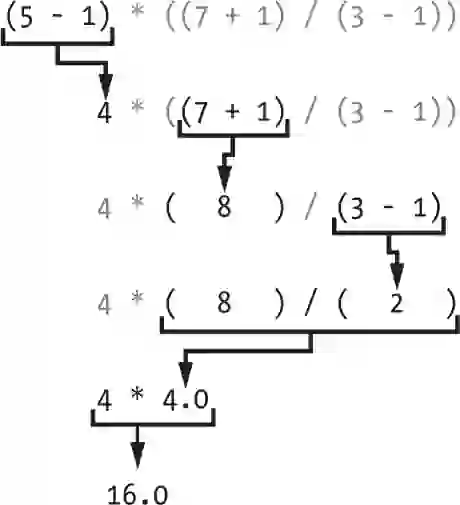
>>> (5 - 1) * ((7 + 1) / (3 - 1))
16.0
In each case, you as the programmer must enter the expression, but Python does the hard part of evaluating it. Python will keep evaluating parts of the expression until it becomes a single value:
These rules for gether to form expressions are a fundamental part of Python as a programming language, just like the grammar rules that help us communicate. Here’s an example:
This is a grammatically correct English sentence.
This grammatically is sentence not English correct a.
The second line is difficult to parse because it doesn’t follow the rules of English. Similarly, if you enter a bad Python instruction, Python won’t be able to understand it and will display a SyntaxError error message, as shown here:
>>> 5 +
File "<python-input-0>", line 1
5 +
^
SyntaxError: invalid syntax
>>> 42 + 5 + * 2
File "<python-input-0>", line 1
42 + 5 + * 2
^
SyntaxError: invalid syntax
You can always test whether an instruction works by entering it into the interactive shell. Don’t worry about breaking the computer; the worst that could happen is that Python responds with an error message. Professional software developers get error messages all the time while writing code.
Remember that expressions are just values combined with operators, and they always evaluate to a single value. A data type is a category for values, and every value belongs to exactly one data type. The most common data types in Python are listed in Table 1-2. The values -2 and 30, for example, are said to be integer values. The integer (or int) data type indicates values that are whole numbers. Numbers with a decimal point, such as 3.14, are called floating-point numbers (or floats). Note that even though the value 42 is an integer, the value 42.0 would be a floating-point number. Programmers often use number to refer to ints and floats collectively, although number itself is not a Python data type.
One subtle detail about Python is that any math performed using an int and a float results in a float, not an int. While 3 + 4 evaluates to the integer 7, the expression 3 + 4.0 evaluates to the floating-point number 7.0. Any division between two integers with the / division operator results in a float as well. For example, 16 / 4 evaluates to 4.0 and not 4. Most of the time, this information doesn’t matter for your program, but knowing it will explain why your numbers may suddenly gain a decimal point.
Python programs can also have text values called strings, or strs (pronounced “stirs”). Always surround your string in single-quote (') characters (as in 'Hello' or 'Goodbye cruel world!') so that Python knows where the string begins and ends. You can even have a string with no characters in it, '', called a blank string or an empty string. Strings are explained in greater detail in Chapter 8.
You may see the error message SyntaxError: unterminated string literal, as in this example:
>>> 'Hello, world!
SyntaxError: unterminated string literal (detected at line 1)
This error means you probably forgot the final single-quote character at the end of the string.
The meaning of an operator may change based on the data types of the values next to it. For example, + is the addition operator when it operates on two integers or floating-point values. However, when + is used to combine two string values, it joins the strings as the string concatenation operator. Enter the following into the interactive shell:
>>> 'Alice' + 'Bob'
'AliceBob'
The expression evaluates down to a single, new string value that combines the text of the two strings. However, if you try to use the + operator on a string and an integer value, Python won’t know how to handle this and will display an error message:
>>> 'Alice' + 42
Traceback (most recent call last):
File "<python-input-0>", line 1, in <module>
'Alice' + 42
TypeError: can only concatenate str (not "int") to str
The error message can only concatenate str (not "int") to str means that Python thought you were trying to concatenate an integer to the string 'Alice'. Your code will have to explicitly convert the integer to a string because Python cannot do this automatically. (I’ll explain how to convert between data types in “Dissecting the Program” on page 14, where we talk about the str(), int(), and float() functions.)
The * operator multiplies two integer or floating-point values. But when the * operator is used on one string value and one integer value, it becomes the string replication operator. Enter a string multiplied by a number into the interactive shell to see this in action:
>>> 'Alice' * 5
'AliceAliceAliceAliceAlice'
The expression evaluates down to a single string value that repeats the original string a number of times equal to the integer value. String replication is a useful trick, but it’s not used as often as string concatenation.
The * operator can only be used with two numeric values (for multiplication), or one string value and one integer value (for string replication). Otherwise, Python will just display an error message, such as the following:
>>> 'Alice' * 'Bob'
Traceback (most recent call last):
File "<python-input-0>", line 1, in <module>
'Alice' * 'Bob'
TypeError: can't multiply sequence by non-int of type 'str'
>>> 'Alice' * 5.0
Traceback (most recent call last):
File "<python-input-0>", line 1, in <module>
'Alice' * 5.0
TypeError: can't multiply sequence by non-int of type 'float'
It makes sense that Python wouldn’t understand these expressions: you can’t multiply two words, and it’s hard to replicate an arbitrary string a fractional number of times.
Expressions, data types, and operators may seem abstract to you right now, but as you learn more about these concepts, you’ll be able to create increasingly sophisticated programs that do math on data pulled from spreadsheets, websites, the output of other programs, and other places.
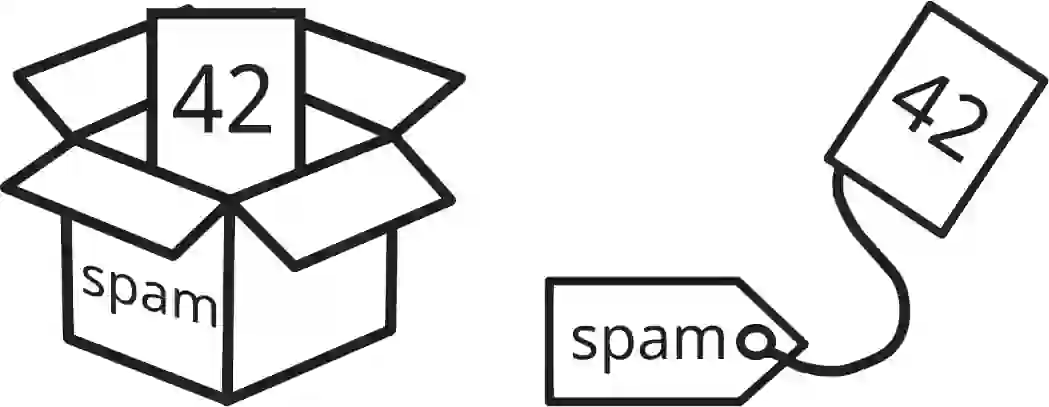
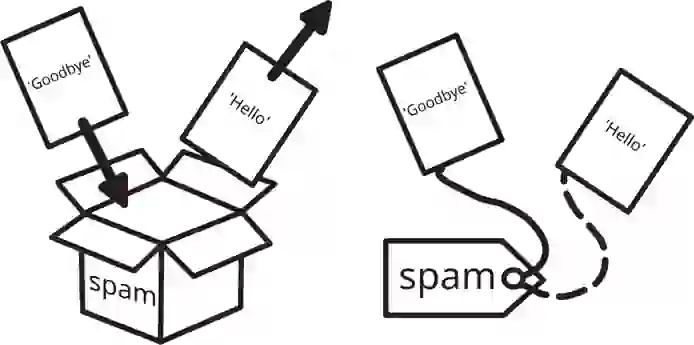
A variable is like a box in the computer’s memory where you can store a single value. If you want to use the result of an evaluated expression later in your program, you can save it inside a variable.
You’ll store values in variables with an assignment statement. An assignment statement consists of a variable name, an equal sign (called the assignment operator), and the value to be stored. If you enter the assignment statement spam = 42, a variable named spam will have the integer value 42 stored in it.
You can think of a variable as a labeled box that a value is placed in, but Chapter 6 explains how a name tag attached to the value might be a better metaphor. Both are shown in Figure 1-1.
For example, enter the following into the interactive shell:
❶ >>> spam = 40
>>> spam
40
>>> eggs = 2
❷ >>> spam + eggs
42
>>> spam + eggs + spam
82
❸ >>> spam = spam + 2
>>> spam
42
A variable is initialized (or created) the first time a value is stored in it ❶. After that, you can use it in expressions with other variables and values ❷. When a variable is assigned a new value ❸, the old value is forgotten, which is why spam evaluated to 42 instead of 40 at the end of the example. This is called overwriting the variable. Enter the following code into the interactive shell to try overwriting a string:
>>> spam = 'Hello'
>>> spam
'Hello'
>>> spam = 'Goodbye'
>>> spam
'Goodbye'
Just like the box in Figure 1-1, the spam variable in Figure 1-2 stores 'Hello' until you replace the string with 'Goodbye'.
You can also think of overwriting a variable as reassigning the name tag to a new value.
A good variable name describes the data it contains. Imagine that you moved to a new house and labeled all of your moving boxes as Stuff. You’d never find anything! Most of this book’s examples (and Python’s documentation) use generic variable names like spam, eggs, and bacon, which come from the Monty Python “Spam” sketch. But in your programs, descriptive names will help make your code more readable.
Though you can name your variables almost anything, Python does have some naming restrictions. Your variable name must obey the following four rules:
Table 1-3 shows examples of legal variable names.
Variable names are case-sensitive, meaning that spam, SPAM, Spam, and sPaM are four different variables. It is a Python convention to start your variables with a lowercase letter: spam instead of Spam.
While the interactive shell is good for running Python instructions one at a time, to write entire Python programs you’ll enter the instructions into the file editor. The file editor is similar to text editors such as Notepad and TextMate, but it has some features specifically for entering source code. To open a new file in Mu, click the New button on the top row.
The tab that appears should contain a cursor awaiting your input, but it’s different from the interactive shell, which runs Python instructions as soon as you press ENTER. The file editor lets you enter many instructions, save the file, and run the program. Here’s how you can tell the difference between the two:
Now it’s time to create your first program! When the file editor window opens, enter the following into it:
# This program says hello and asks for my name.
print('Hello, world!')
print('What is your name?') # Ask for their name.
my_name = input('>')
print('It is good to meet you, ' + my_name)
print('The length of your name is:')
print(len(my_name))
print('What is your age?') # Ask for their age.
my_age = input('>')
print('You will be ' + str(int(my_age) + 1) + ' in a year.')
Once you’ve entered your source code, save it so that you won’t have to retype it each time you start Mu. Click Save, enter hello.py in the File Name field, and then click Save.
You should save your programs every once in a while as you type them. That way, if the computer crashes or you accidentally exit Mu, you won’t lose the code. As a shortcut, you can press CTRL-S on Windows and Linux or -S on macOS to save your file.
Once you’ve saved, let’s run our program. Press the F5 key or click the Run button. Enter your name when your program asks for it. The program’s output in the interactive shell should look something like this:
Hello, world!
What is your name?
>Al
It is good to meet you, Al
The length of your name is:
2
What is your age?
>4
You will be 5 in a year.
>>>
When there are no more lines of code to execute, the Python program terminates; that is, it stops running. (You can also say that the Python program exits.) The Mu editor displays the >>> interactive shell prompt after the program terminated, in case you’d like to enter some further Python code.
You can close the file editor by clicking the X on the file’s tab, just like closing a browser tab. To reload a saved program, click Load from the menu. Do that now, and in the window that appears, choose hello.py and click the Open button. Your previously saved hello.py program should open in the file editor window.
You can view the step-by-step execution of a program using the Python Tutor visualization tool at http://pythontutor.com. Click the forward button to move through each step of the program’s execution. You’ll be able to see how the variables’ values and the output change.
With your new program open in the file editor, let’s take a quick tour of the Python instructions it uses by looking at what each line of code does.
The following line is called a comment:
# This program says hello and asks for my name.
Python ignores comments, and you can use them to write notes or remind yourself what the code is trying to do. Any text for the rest of the line following a hash mark (#) is part of a comment.
Sometimes programmers will put a # in front of a line of code to temporarily remove it while testing a program. This is called commenting out code, and it can be useful when you’re trying to figure out why a program isn’t working. You can remove the # later when you are ready to put the line back in.
Python also ignores the blank line after the comment. You can add as many blank lines to your program as you want. This spacing can make your code easier to read, like paragraphs in a book.
The print() function displays the string value inside its parentheses on the screen:
print('Hello, world!')
print('What is your name?') # Ask for their name.
The line print('Hello, world!') means “Print out the text in the string 'Hello, world!'.” When Python executes this line, you say that Python is calling the print() function and the string value is being passed to the function. A value that is passed to a function call is an argument. Notice that the quotes are not printed to the screen. They just mark where the string begins and ends; they are not part of the string value’s text.
NOTE
You can also use this function to display a blank line on the screen; call print() with nothing in between the parentheses.
When you write a function name, the opening and closing parentheses at the end identify it as the name of a function. This is why in this book, you’ll see print() rather than print. It’s a standard convention to have no spaces in between the function name and the opening parentheses, even though Python doesn’t require this. Chapter 3 describes functions in more detail.
The input() function waits for the user to type some text on the keyboard and press ENTER:
my_name = input('>')
This function call evaluates to a string identical to the user’s text, and the rest of the code assigns the my_name variable to this string value. The '>' string passed to the function causes the > prompt to appear, which serves as an indicator to the user that they are expected to enter something. Your programs don’t have to pass a string to the input() function; if you call input(), the program will wait for the user’s text without displaying any prompt.
You can think of the input() function call as an expression that evaluates to whatever string the user typed. If the user entered 'Al', the assignment statement would effectively be my_name = 'Al'.
If you call input() and see an error message, like NameError: name 'Al' is not defined, the problem is that you’re running the code with Python 2 instead of Python 3.
The following call to print() contains the expression 'It is good to meet you, ' + my_name between the parentheses:
print('It is good to meet you, ' + my_name)
Remember that expressions can always evaluate to a single value. If 'Al' is the value stored in my_name, then this expression evaluates to 'It is good to meet you, Al'. This single string value is then passed to print(), which prints it on the screen.
You can pass the len() function a string value (or a variable containing a string), and the function evaluates to the integer value of the number of characters in that string:
print('The length of your name is:')
print(len(my_name))
Enter the following into the interactive shell to try this:
>>> len('hello')
5
>>> len('My very energetic monster just scarfed nachos.')
46
>>> len('')
0
Just like in those examples, len(my_name) evaluates to an integer. We say that the len() function call returns or outputs this integer value, and the value is the function call’s return value. It is then passed to print() to be displayed on the screen. The print() function allows you to pass it either integer values or string values, but notice the error that shows up when you enter the following into the interactive shell:
>>> print('I am ' + 29 + ' years old.')
Traceback (most recent call last):
File "<python-input-0>", line 1, in <module>
print('I am ' + 29 + ' years old.')
TypeError: can only concatenate str (not "int") to str
The print() function isn’t causing that error; rather, it’s the expression you tried to pass to print(). You’ll get the same error message if you type the expression into the interactive shell on its own:
>>> 'I am ' + 29 + ' years old.'
Traceback (most recent call last):
File "<python-input-0>", line 1, in <module>
'I am ' + 29 + ' years old.'
TypeError: can only concatenate str (not "int") to str
Python gives an error because the + operator can be used only to add two numbers together or to concatenate two strings. You can’t add an integer to a string because this is not allowed in Python. You can fix this by using a string version of the integer instead, as explained in the next section.
If you want to concatenate an integer such as 29 with a string to pass to print(), you’ll need to get the value '29', which is the string form of 29. The str() function can be passed an integer value and will return a string value version of the integer, as follows:
>>> str(29)
'29'
>>> print('I am ' + str(29) + ' years old.')
I am 29 years old.
Because str(29) evaluates to '29', the expression 'I am ' + str(29) + ' years old.' evaluates to 'I am ' + '29' + ' years old.', which in turn evaluates to 'I am 29 years old.' This is the string value that is passed to the print() function.
The str(), int(), and float() functions will evaluate to the string, integer, and floating-point forms of the value you pass, respectively. Try converting some values in the interactive shell with these functions, and watch what happens:
>>> str(0)
'0'
>>> str(-3.14)
'-3.14'
>>> int('42')
42
>>> int('-99')
-99
>>> int(1.25)
1
>>> int(1.99)
1
>>> float('3.14')
3.14
>>> float(10)
10.0
The previous examples call the str(), int(), and float() functions and pass them values of the other data types to obtain a string, integer, or floating-point form of those values.
The str() function is handy when you have an integer or float that you want to concatenate to a string. The int() function is also helpful if you have a number as a string value that you want to use in some mathematics. For example, the input() function always returns a string, even if the user enters a number. Enter spam = input('>') into the interactive shell, then enter 101 when it waits for your text:
>>> spam = input('>')
>101
>>> spam
'101'
The value stored inside spam isn’t the integer 101 but the string '101'. If you want to do math using the value in spam, use the int() function to get its integer form and then store this as the variable’s new value. If spam is the string '101', then the expression int(spam) will evaluate to the integer value 101, and the assignment statement spam = int(spam) will be equivalent to spam = 101:
>>> spam = int(spam)
>>> spam
101
Now you should be able to treat the spam variable as an integer instead of a string:
>>> spam * 10 / 5
202.0
Note that if you pass a value to int() that it cannot evaluate as an integer, Python will display an error message:
>>> int('99.99')
Traceback (most recent call last):
File "<python-input-0>", line 1, in <module>
int('99.99')
ValueError: invalid literal for int() with base 10: '99.99'
>>> int('twelve')
Traceback (most recent call last):
File "<python-input-0>", line 1, in <module>
int('twelve')
ValueError: invalid literal for int() with base 10: 'twelve'
The int() function is also useful if you need to round a floating-point number down:
>>> int(7.7)
7
>>> int(7.7) + 1
8
You used the int() and str() functions in the last three lines of your program to get a value of the appropriate data type for the code:
print('What is your age?') # Ask for their age.
my_age = input('>')
print('You will be ' + str(int(my_age) + 1) + ' in a year.')
The my_age variable contains the value returned from input(). Because the input() function always returns a string (even if the user entered a number), you can use the int(my_age) code to return an integer value of the string in my_age. This integer value is then added to 1 in the expression int(my_age) + 1.
The result of this addition is passed to the str() function: str(int(my _age) + 1). The string value returned is then concatenated with the strings 'You will be ' and ' in a year.' to evaluate to one large string value. This large string is finally passed to print() to be displayed on the screen.
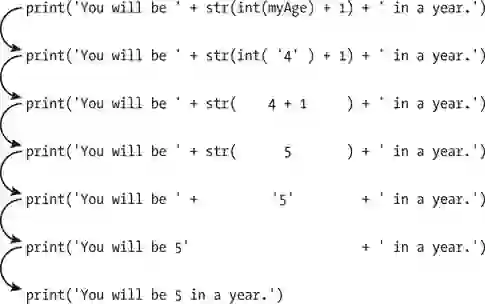
Let’s say the user enters the string '4' for my_age. The evaluation steps would look something like the following:
The string '4' is converted to an integer, so you can add 1 to it. The result is 5. The str() function converts the result back to a string, so you can concatenate it with the second string, 'in a year.', to create the final message.
Integer, floating-point, and string aren’t the only data types in Python. As you continue to learn about programming, you may come across values of other data types. You can always pass these to the type() function to determine what type they are. For example, enter the following into the interactive shell:
>>> type(42)
<class 'int'>
>>> type(42.0)
<class 'float'>
>>> type('forty two')
<class 'str'>
>>> name = 'Zophie'
>>> type(name) # The name variable has a value of the string type.
<class 'str'>
>>> type(len(name)) # The len() function returns integer values.
<class 'int'>
Not only can you pass any value to type(), but (as with any function call) you can also pass it any variable or expression to determine the data type of the value that it evaluates to. The type() function itself returns values, but the angle brackets mean they are not syntactically valid Python code; you cannot run code like spam = <class 'str'>.
Let’s learn about two more Python functions that, like the len() function, take an argument and return a value. The round() function accepts a float value and returns the nearest integer. Enter the following into the interactive shell:
>>> round(3.14)
3
>>> round(7.7)
8
>>> round(-2.2)
-2
The round() function also accepts an optional second argument specifying how many decimal places it should round. Enter the following into the interactive shell:
>>> round(3.14, 1)
3.1
>>> round(7.7777, 3)
7.778
The behavior for rounding half numbers is a bit odd. The function call round(3.5) rounds up to 4, while round(2.5) rounds down to 2. For halfway numbers that end with .5, the number is rounded to the nearest even integer. This is called banker’s rounding.
The abs() function returns the absolute value of the number argument. In mathematics, this is defined as the distance from 0, but I find it easier to think of it as the positive form of the number. Enter the following into the interactive shell:
>>> abs(25)
25
>>> abs(-25)
25
>>> abs(-3.14)
3.14
>>> abs(0)
0
Python comes with several different functions that you’ll learn about in this book. This section demonstrates how you can experiment with them in the interactive shell to see how they behave with different inputs. This is a common technique for practicing the new code that you learn.
That’s enough Python code for now. At this point, you might think that programming seems almost magical. How does the computer know to transform 2 + 2 into 4? The answer is too complicated for this book, but I can explain part of what’s going on behind the scenes by discussing what binary numbers (numbers that have only the digits 1 and 0) have to do with computing.
Hacking in movies often involves streams of 1s and 0s flowing across the screen. This looks mysterious and impressive, but what do these 1s and 0s actually mean? The answer is that binary is the simplest number system, and it can be implemented with inexpensive components for computer hardware. Binary, also called the base-2 number system, can represent all of the same numbers that our more familiar base-10 decimal number system can. Decimal has 10 digits, 0 through 9. Table 1-4 shows the first 27 integers in decimal and binary.
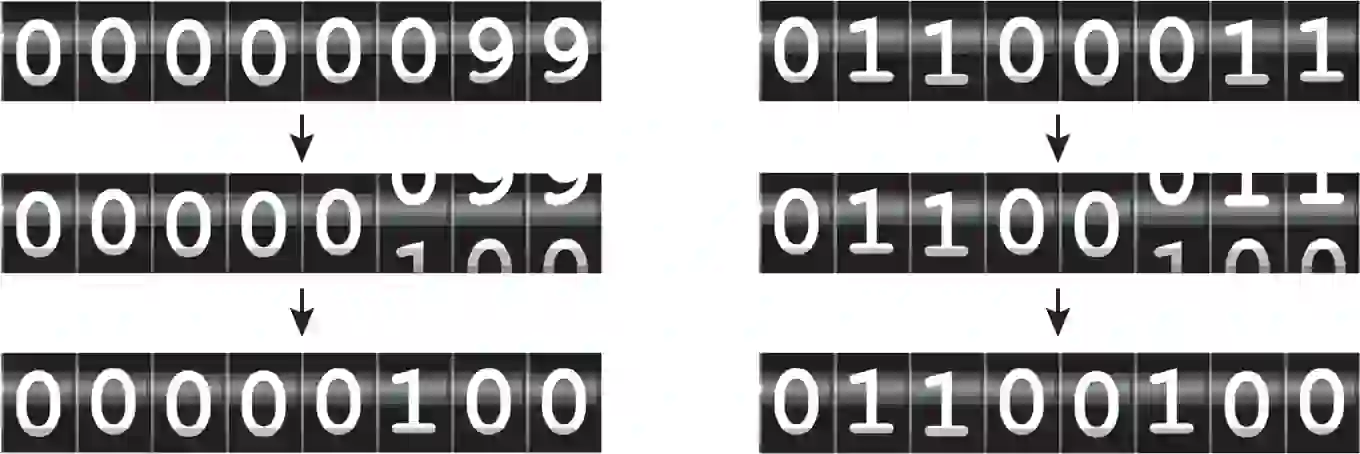
Think of these number systems as a mechanical odometer, like in Figure 1-3. When you reach the last digit, they each reset to 0 while incrementing the value of the next digit over. In decimal, the last digit is 9, and in binary, the last digit is 1. That’s why the decimal number after 9 is 10 and the decimal number after 999 is 1000. Similarly, the binary number after 1 is 10 and the binary number after 111 is 1000. However, 10 in binary doesn’t represent the same quantity as ten in decimal; rather, it represents two. And 1000 in binary doesn’t mean one thousand in decimal, but rather eight. You can view an interactive binary and decimal odometer at https://
Representing binary numbers with computer hardware is simpler than representing decimal numbers because there are only two states to represent. For example, Blu-ray discs and DVDs have smooth lands and indented pits etched on their surface that will or won’t reflect the disc player’s laser, respectively. Circuits can have electric current flowing through them or no electric current. These various hardware standards all have ways of representing two different states. On the other hand, it’d be expensive to create high-quality electronic components that are sensitive enough to detect the difference between 10 different voltage levels with reliable accuracy. It’s more economical to use simple components, and two binary states are as simple as you can get.
These binary digits are called bits for short. A single bit can represent two numbers, and 8 bits (or 1 byte) can represent 28, or 256, numbers, ranging from 0 to 255 in decimal or 0 to 11111111 in binary. This is similar to how a single decimal digit can represent 10 numbers (0 to 9), while an eight-digit decimal number can represent 108 or 100,000,000 numbers (0 to 99,999,999). Files on your computer are measured in how many bytes they take up:
The text of Shakespeare’s Romeo and Juliet is about 135KB. A high-resolution photo is about 2MB to 5MB. A movie can be anywhere from 1GB to 50GB, depending on picture quality and movie length. However, hard drive and flash memory manufacturers blatantly lie about what these terms mean. For example, by calling a TB 1,000,000,000,000 bytes instead of 1,099,511,627,776 bytes, they can advertise a 9.09TB hard drive as 10TB.
The 1s and 0s of binary can represent not only any integer but also any form of data. Instead of 0 to 255, a byte can represent the numbers –128 to 127 using a system called two’s complement. Fractional floating-point numbers can be represented in binary using a system called IEEE-754.
Text can be stored on computers as binary numbers by assigning each letter, punctuation mark, or symbol a unique number. A system for representing text as numbers is called an encoding. The most popular encoding for text is UTF-8. In UTF-8, a capital letter A is represented by the decimal number 65 (or 01000001 as an 8-bit binary number), a ? (question mark) is represented by the number 63, and the numeral character 7 is represented by the number 55. The string 'Hello' is stored as the numbers 72, 101, 108, 108, and 111. When stored in a computer, “Hello” appears as a stream of bits: 0100100001100101011011000110110001101111.
Wow! Just like in those hacker movies!
Engineers need to invent a way to encode each form of data as numbers. Photos and images can be broken up into a two-dimensional grid of colored squares called pixels. Each pixel can use three bytes to represent how much red, green, and blue color it contains. (Chapter 21 covers image data in more detail.) But for a short example, the numbers 255, 0, and 255 could represent a pixel with the maximum amount of red and blue but zero green, resulting in a purple pixel.
Sound is made up of waves of compressed air that reach our ears, which our brains interpret as audio sensation. We can graph the intensity and frequency of these waves over time. The numbers on this graph can then be converted to binary numbers and stored on a computer, which later control speakers to reproduce the sound. This is a simplification of how computer audio works, but describes how numbers can represent Beethoven’s Symphony No. 5.
The data for several images combines with audio data to store videos. All forms of information can be encoded into binary numbers. There is, of course, a great deal more detail to it than this, but this is how 1s and 0s represent the wide variety of data in our information age.
You can compute expressions with a calculator or enter string concatenations with a word processor. You can even do string replication easily by copying and pasting text. But expressions, and their component values—operators, variables, and function calls—are the basic building blocks that make up programs. Once you know how to handle these elements, you will be able to instruct Python to operate on large amounts of data for you.
You’ll find it helpful to remember the different types of operators (+, -, *, /, //, %, and ** for math operations, and + and * for string operations) and the three data types (integers, floating-point numbers, and strings) introduced in this chapter.
I introduced a few different functions as well. The print() and input() functions handle simple text output (to the screen) and input (from the keyboard). The len() function takes a string and evaluates to an int of the number of characters in the string. The str(), int(), and float() functions will evaluate to the string, integer, or floating-point number form of the value they are passed. The round() function returns the rounded integer, and the abs() function returns the absolute value of the arguments.
In the next chapter, you’ll learn how to tell Python to make intelligent decisions about what code to run, what code to skip, and what code to repeat based on the values it has. This is known as flow control, and it allows you to write programs that make intelligent decisions.
1. Which of the following are operators, and which are values?
*
'hello'
-88.8
-
/
+
5
2. Which of the following is a variable, and which is a string?
spam
'spam'
3. Name three data types.
4. What is an expression made up of? What do all expressions do?
5. This chapter introduced assignment statements, like spam = 10. What is the difference between an expression and a statement?
6. What does the variable bacon contain after the following code runs?
bacon = 20
bacon + 1
7. What should the following two expressions evaluate to?
'spam' + 'spamspam'
'spam' * 3
8. Why is eggs a valid variable name while 100 is invalid?
9. What three functions can be used to get the integer, floating-point number, or string version of a value?
10. Why does this expression cause an error? How can you fix it?
'I eat ' + 99 + ' burritos.'
Extra credit: Search online for the Python documentation for the len() function. It will be on a web page titled “Built-in Functions.” Skim the list of other functions Python has, look up what the bin() and hex() functions do, and experiment with them in the interactive shell.